

Description
Download Keyboard Shortcuts – Free Windows Utility for Custom Keyboard Shortcuts
Why Keyboard Shortcuts Is a Must-Have Tool for Windows Users
In today’s fast-paced digital world, efficiency is key. Whether you're a student, professional, or casual user, mastering keyboard shortcuts can drastically improve your workflow. Keyboard Shortcuts is a lightweight, free software utility designed specifically for Windows users who want to boost their productivity by creating custom keyboard shortcuts. Developed by Goheer and first released in 2005, this tool has stood the test of time, earning over 47,000 installations and remaining a favorite among users in India, Pakistan, and Bangladesh. Despite its age, the software continues to deliver reliable performance on Windows 2000 and later versions, proving that simplicity and functionality still matter.
What sets Keyboard Shortcuts apart is its minimal footprint and ease of use. Unlike modern apps that demand high system resources, this utility runs smoothly on older machines without slowing down your system. It doesn’t require installation in the traditional sense—just download, run, and start customizing. The interface is clean and intuitive, making it accessible even for users with limited technical knowledge. Whether you want to launch a specific application with a single keystroke, open a frequently used file, or automate repetitive tasks, Keyboard Shortcuts gives you full control. It’s especially useful for users who rely heavily on keyboard navigation and want to minimize mouse dependency.
Another major advantage is its language support—available only in English, which ensures consistency across global usage. While it may not have the flashy features of modern alternatives, its core functionality remains unmatched in its simplicity. For users looking for a no-frills, secure, and dependable way to streamline their daily tasks, Keyboard Shortcuts is an excellent choice. It’s a true example of how a well-designed, lightweight tool can still hold its ground in today’s crowded software market.
Key Features and How to Use Keyboard Shortcuts Effectively
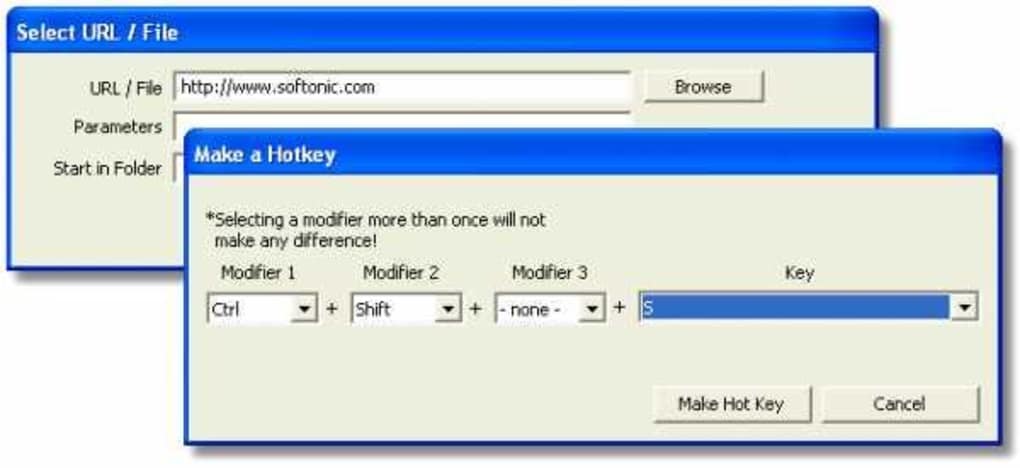
Keyboard Shortcuts offers a powerful yet straightforward feature set that makes it ideal for both beginners and advanced users. The tool allows you to assign custom keyboard combinations to launch programs, open files, run scripts, or execute commands. This level of customization means you can tailor your workflow to match your habits and preferences, saving valuable time every day. For instance, you could set Ctrl + Shift + P to open your favorite project folder or Alt + F1 to launch your default web browser.
One of the standout features is its ability to work with any executable file or document, giving you flexibility across your entire system. You don’t need to be a programmer to use it—just browse to the file or program you want to launch, assign a shortcut, and save it. The software also supports hotkeys for system commands, such as shutting down, restarting, or opening the Task Manager, which is incredibly useful for quick access.
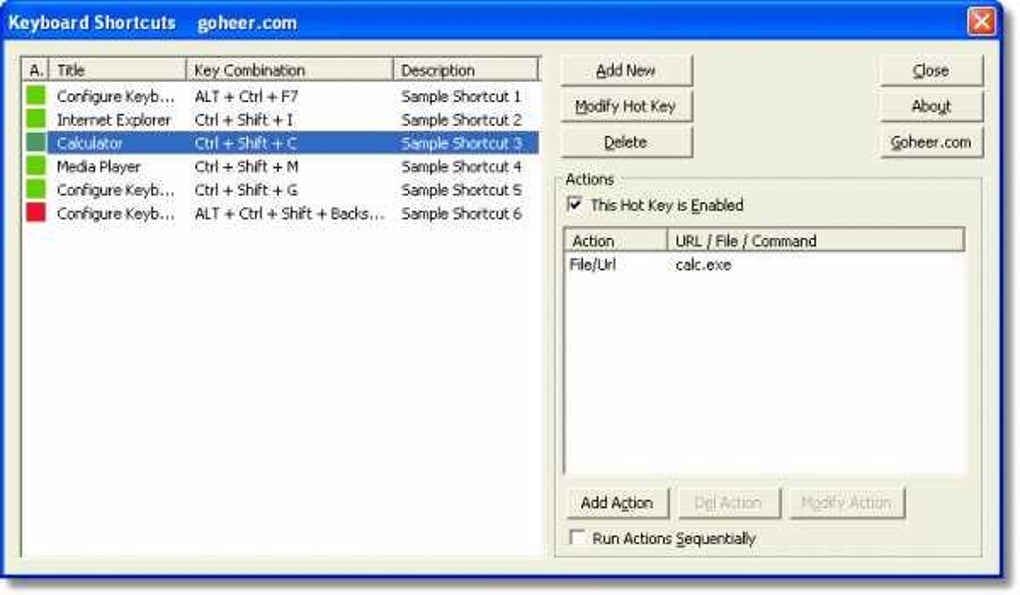
Another practical feature is the built-in shortcut manager. You can view, edit, or delete existing shortcuts at any time, ensuring your setup stays organized. The tool also runs in the background, starting automatically with Windows, so your shortcuts are always ready when you need them. Despite its age, Keyboard Shortcuts remains secure and free from malware, a rare quality in older software. With regular updates (the last one in 2005), it’s stable and reliable, making it a trusted companion for long-term use.
- Assign custom keyboard shortcuts to launch programs or open files
- Support for executable files, documents, and system commands
- Lightweight and runs efficiently on older systems
- Automatic startup with Windows for instant access
- Simple interface with no complex setup required
Compatibility, Installation, and Best Practices for Maximum Efficiency
Keyboard Shortcuts is designed for the Windows operating system, supporting Windows 2000 and all subsequent versions, including Windows XP, Vista, 7, 8, and 10. This broad compatibility makes it accessible to a wide range of users, especially those still running legacy systems or using older hardware. Since it doesn’t require installation, you can run it from a USB drive or portable storage, making it perfect for users who need a consistent setup across multiple machines.
To get started, simply download the software from the official website or trusted sources. The file size is minimal—typically under 1 MB—so it downloads quickly even on slow connections. Once downloaded, extract the files (if necessary) and run the executable. The program launches immediately, and you’re ready to assign your first shortcut. No admin rights are required, which is a major plus for users on restricted networks or shared computers.
For optimal performance, follow these best practices: avoid using system-reserved shortcuts (like Ctrl + Alt + Del), choose unique key combinations to prevent conflicts, and regularly review your shortcut list to remove unused entries. It’s also wise to back up your shortcut configurations if you plan to reinstall your system. Because the software stores settings in a simple configuration file, you can easily copy it to another machine or save it for future use.
While the software hasn’t been updated in nearly two decades, its core functionality remains solid. Users in India, Pakistan, and Bangladesh have reported high satisfaction, especially in educational and office environments where cost-effective tools are highly valued. Its long-standing presence in the software community speaks volumes about its reliability and user trust.
Frequently Asked Questions (FAQ)
Is Keyboard Shortcuts safe to download and use?
Yes, Keyboard Shortcuts is a secure, malware-free utility. It has been widely used since 2005 and has a strong reputation for safety. Always download from the official website or trusted platforms to avoid tampered versions.
Can I use Keyboard Shortcuts on Windows 10 and Windows 11?
Yes, Keyboard Shortcuts is compatible with Windows 10 and Windows 11. It runs without issues on these systems, though it’s designed for older architectures, so it may not have modern UI enhancements.
Do I need to install it to use it?
No, Keyboard Shortcuts is a portable app. You can run it directly from a folder or USB drive without installation. This makes it ideal for temporary or shared use.
Can I assign shortcuts to system commands?
Yes, you can assign shortcuts to common system tasks like opening the Task Manager, shutting down, restarting, or launching the Control Panel.
Is the software available in languages other than English?
Currently, Keyboard Shortcuts is only available in English. This ensures clarity and consistency, especially for international users.
Final Verdict: A Time-Tested Tool for Keyboard Power Users
Despite being over 15 years old, Keyboard Shortcuts remains a powerful and practical tool for Windows users who value efficiency and simplicity. Its lightweight design, ease of use, and reliable performance make it a standout in the software utilities category. While it lacks modern features like cloud sync or touch support, it excels in its core purpose: helping users create custom keyboard shortcuts with minimal effort.
For those seeking a free, secure, and lightweight app to enhance productivity, this software is an excellent choice. Whether you're working on an old laptop or a modern PC, Keyboard Shortcuts delivers consistent results. It’s especially valuable for users in developing regions where access to premium software is limited.
Download Keyboard Shortcuts today and take control of your workflow. It’s free, fast, and built to last—proving that great software doesn’t need to be new to be effective.
- Custom keyboard shortcuts for programs and files
- Portable and no installation required
- Compatible with Windows 2000 and later
- Lightweight and low system resource usage
- Supports system commands and scripts
- A reliable, no-nonsense tool that works exactly as promised. Perfect for power users who want speed and simplicity.
- Free and secure
- Extremely lightweight
- Works on older Windows systems
- No installation needed
- Simple and intuitive interface
- Outdated user interface
- No updates since 2005
- Limited to English
- No modern features like cloud sync
- Not compatible with macOS or Linux
Guides & Tutorials for Keyboard Shortcuts
How to install Keyboard Shortcuts
- Click the Preview / Download button above.
- Once redirected, accept the terms and click Install.
- Wait for the Keyboard Shortcuts download to finish on your device.
How to use Keyboard Shortcuts
This software is primarily used for its core features described above. Open the app after installation to explore its capabilities.
User Reviews for Keyboard Shortcuts 0
No reviews found





